In one of my last blogs, I gave an overview of the USB Class 2 Audio functionality provided by the AudioTools library
Many users were struggeling to get the process of receiving data via USB and writing to I2S stable and working properly. In this blog I am providing a deep dive of the releated challenges and the solution approaches:
Standard Processing Logic
Here is a simple basic sketch that demonstrates the standard processing logic:
#include "AudioTools.h"
#include "AudioTools/Communication/USB/USBAudioStream.h"

AudioInfo info(48000, 2, 16);
USBAudioStream in;
MeasuringStream out(500, &Serial);
StreamCopy copier(out, in, 80);

void setup() {
  // Manual begin() is required on core without built-in support e.g. mbed
  // rp2040
  if (!TinyUSBDevice.isInitialized()) {
    TinyUSBDevice.begin(0);
  }

  // Start MeasuringStream so it knows the audio format.
  out.begin(info);

  // Register USB audio in RX mode (host → device, i.e. USB speaker).
  // begin_usb defaults to false so USB.begin() below controls the start.
  auto config = in.defaultConfig(RX_MODE);
  config.copyFrom(info);
  config.fifo_packets = 32;
  in.begin(config);

  // If already enumerated, additional class driver begin() e.g msc, hid, midi
  // won't take effect until re-enumeration: on ESP32 you can alternatively call USB.begin()
  if (TinyUSBDevice.mounted()) {
    TinyUSBDevice.detach();
    delay(10);
    TinyUSBDevice.attach();
  }
}

void loop() {
  copier.copy();  // read ep_out_ff → MeasuringStream
}
The audio data is first copied into an internal USB buffer: it’s size is defined by the fifo_packets configuration setting. By default 32 ms of data is defined which should usually be big enough.
We use a StreamCopy to copy the data from the USB buffer to the required destionation: in the example above we copy to a MeasuringStream which just reports the data thruput. There is an automatic feedback in place that prevents the USB from over and underflowing which is active when config.enable_feedback_ep is true, which it is by default.
This mechanism works perfectly, when draining of the USB buffer to the destination is quick: e.g when writing the data to a SD drive, sending it via UDP or just measuring the content for the volume, thruput frequency using FFT etc. This should now also work reliably for I2S.
Extended Processing Logic: External Bufers
Initially there was a bug in the synchronization logic which was leading to a scenario where we use an external buffer and provide the feedback from this external buffer: We can use the I2S buffer for this. Furtunately we can do this with the help of the setFeedbackPercent(int percent) method:
#include "AudioTools.h"
#include "AudioTools/Communication/USB/USBAudioStream.h"

AudioInfo info(48000, 2, 16);
USBAudioStream in;
I2SStream out;
StreamCopy copier(out, in);

// diagnostics: total capacity of the I2S output buffer, so we can print
// out.availableForWrite() as a percentage (see setup()/loop())
size_t i2s_buffer_capacity = 0;


void setup() {
  // Manual begin() is required on core without built-in support e.g. mbed
  // rp2040
  if (!TinyUSBDevice.isInitialized()) {
    TinyUSBDevice.begin(0);
  }

  // Start I2S so it knows the audio format.
  auto cfg = out.defaultConfig(TX_MODE);
  cfg.copyFrom(info);
  cfg.buffer_size = 512;
  cfg.buffer_count = 20;
  out.begin(cfg);
  // Capture the true capacity directly from the driver right after begin()
  // (buffer is empty here, so availableForWrite() == full capacity) --
  // avoids assuming buffer_size/buffer_count map 1:1 to availableForWrite()'s
  // units, which they don't on RP2040 (confirmed by the initial >100% readings).
  i2s_buffer_capacity = (size_t)out.availableForWrite();

  // Register USB audio in RX mode (host → device, i.e. USB speaker).
  // begin_usb defaults to false so USB.begin() below controls the start.
  auto config = in.defaultConfig(RX_MODE);
  config.copyFrom(info);
  //config.fifo_packets = 10;
  in.begin(config);

  // If already enumerated, additional class driver begin() e.g msc, hid, midi
  // won't take effect until re-enumeration: on ESP32 you can alternatively call USB.begin()
  if (TinyUSBDevice.mounted()) {
    TinyUSBDevice.detach();
    delay(10);
    TinyUSBDevice.attach();
  }
}

void loop() {
  //read USB RX buffer → I2S
  copier.copy();  // read USB RX buffer → I2S

  // Update feedback percent
  int i2s_free_pct = 100 * i2s_stream.availableForWrite() / (int)i2s_buffer_capacity;
  usb_stream.setFeedbackPercent(i2s_free_pct);
}
This is using the same data flow like the one described in the initial Standard Processing Logic chapter with the only difference that the fill level of the I2S buffer is used for the USB data feedback synchronization. This is preventing the I2S buffer under and overflows.
Optimized Processing Logic: I2S
The copy logic in the loop above adds quite some overhead because we need to make sure that both the I2S and the USB buffers are big enough so that we are not running out of buffers between the different copy calls. We can optimize this by just forwarding the data to the I2S buffer, whenever we received any data. This is exactily what the setRxDoneCallback() method is desiged for.
Here is the improved sketch:
#include "AudioTools.h"
#include "AudioTools/Communication/USB/USBAudioStream.h"

AudioInfo info(48000, 2, 16);
USBAudioStream in;
I2SStream out;

// diagnostics: total capacity of the I2S output buffer, so we can print
// out.availableForWrite() as a percentage (see setup()/loop())
size_t i2s_buffer_capacity = 0;

// Callback to push data to I2S
bool rxDone(USBAudioDeviceBase* p_usb, uint8_t, USBAudioDeviceBase::audiod_function_t*, uint16_t) {
    // read Audio data
    int len = in.bufferRx().available();
    uint8_t data[len];
    in.bufferRx().readArray(data, len);

    // write to I2S
    out.write(data, len);

    // update feedback
    int i2s_free_pct = 100 * out.availableForWrite() / (int)i2s_buffer_capacity;
    in.setFeedbackPercent(i2s_free_pct);
    return true;
}

void setup() {
  // Manual begin() is required on core without built-in support e.g. mbed
  // rp2040
  if (!TinyUSBDevice.isInitialized()) {
    TinyUSBDevice.begin(0);
  }

  // Start I2S so it knows the audio format.
  auto cfg = out.defaultConfig(TX_MODE);
  cfg.copyFrom(info);
  cfg.buffer_size = 256;
  cfg.buffer_count = 10;
  out.begin(cfg);

  // Capture the true capacity directly from the driver right after begin()
  // (buffer is empty here, so availableForWrite() == full capacity) --
  // avoids assuming buffer_size/buffer_count map 1:1 to availableForWrite()'s
  // units, which they don't on RP2040 (confirmed by the initial >100% readings).
  i2s_buffer_capacity = (size_t)out.availableForWrite();

  // We can avoid a copy in the loop by triggering a write to i2s when we receive a packet
  in.setRxDoneCallback(rxDone);

  // Register USB audio in RX mode (host → device, i.e. USB speaker).
  // begin_usb defaults to false so USB.begin() below controls the start.
  auto config = in.defaultConfig(RX_MODE);
  config.copyFrom(info);
  config.fifo_packets = 1;
  in.begin(config);


  // If already enumerated, additional class driver begin() e.g msc, hid, midi
  // won't take effect until re-enumeration: on ESP32 you can alternatively call USB.begin()
  if (TinyUSBDevice.mounted()) {
    TinyUSBDevice.detach();
    delay(10);
    TinyUSBDevice.attach();
  }
}

void loop() {}
The StreamCopy is gone and the corresponding logic is executed in the rxDone callback method: This approch lets us decrease the buffers down to a minimum!
I2S w/o Feedback Synchronization
Last but not least I want do show a scenario where we do not rely on the USB feedback synchronization mechanism, but we use an additional buffer and a resampler to regulate the playback speed automatically: When the buffer is getting full we are playing too slow, if it getting empty the playback is too fast: A Kalman Filter is used to regulate the resampling correction rate:
#include "AudioTools.h"
#include "AudioTools/Communication/USB/USBAudioStream.h"
#include "AudioTools/Communication/AdaptiveResamplingStream.h"

AudioInfo info(48000, 2, 16);
USBAudioStream in;
RingBufferSPSC<uint8_t> buffer(1024 * 5);
AdaptiveResamplingStream resampler(buffer, 2.0f);
I2SStream out;
StreamCopy copier(out, resampler);

bool rxDone(USBAudioDeviceBase* p_usb, uint8_t, USBAudioDeviceBase::audiod_function_t*, uint16_t) {
    int len = in.bufferRx().available();
    uint8_t data[len];
    in.bufferRx().readArray(data, len);
    // fill resampler
    resampler.write(data, len);
    return true;
}

void setup() {
  // Manual begin() is required on core without built-in support e.g. mbed
  // rp2040
  if (!TinyUSBDevice.isInitialized()) {
    TinyUSBDevice.begin(0);
  }

  // Start I2S so it knows the audio format.
  auto cfg = out.defaultConfig(TX_MODE);
  cfg.copyFrom(info);
  cfg.buffer_size = 256;
  cfg.buffer_count = 5;
  out.begin(cfg);

  // Start the resampler
  resampler.begin(info);

  // We can avoid a copy in the loop by triggering a write to i2s when we receive a packet
  in.setRxDoneCallback(rxDone);

  // Register USB audio in RX mode (host → device, i.e. USB speaker).
  // begin_usb defaults to false so USB.begin() below controls the start.
  auto config = in.defaultConfig(RX_MODE);
  config.copyFrom(info);
  config.fifo_packets = 1;
  config.enable_feedback_ep = false;
  in.begin(config);

  // If already enumerated, additional class driver begin() e.g msc, hid, midi
  // won't take effect until re-enumeration: on ESP32 you can alternatively call USB.begin()
  if (TinyUSBDevice.mounted()) {
    TinyUSBDevice.detach();
    delay(10);
    TinyUSBDevice.attach();
  }

  MySerial.println("USB audio RX + CDC started");
}

void loop() {
  copier.copy();
}
The AdaptiveResamplingStream is doing the heavy lifting here: We just need to provide it with a buffer: The single producer and single consumer RingBufferSPSC is used in our case and a max resampling percentage: above we limit it to +- 2%!
Like in the previos example we use the rxDone() callback just to forward the data to the AdaptiveResamplingStream/RingBufferSPSC!
Conclusion
Receiving audio over USB turned out to be much more than simply reading samples from an endpoint. Behind the seemingly straightforward USB Audio Class lies a surprisingly sophisticated protocol with descriptors, alternate interface settings, clock synchronization, feedback mechanisms, and isochronous transfers that all have to work together before the first audio sample reaches your application.
The good news is that once these concepts are understood, the implementation becomes much less mysterious. By leveraging TinyUSB and integrating the USB transport into the AudioTools framework, it is possible to expose USB audio as just another audio source, making it easy to combine with existing codecs, DSP pipelines, recorders, network streams, or file writers without introducing USB-specific code into the application layer.
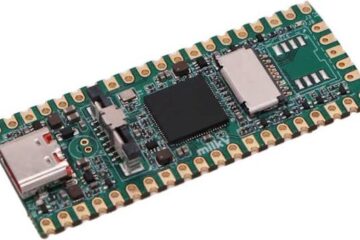
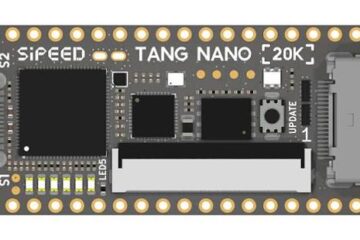
This project also demonstrates that modern microcontrollers such as the ESP32-S3 and the RP2040 have enough processing power to act as capable USB audio devices while still leaving room for additional audio processing. Whether you want to build a USB microphone, capture audio from a computer, implement a measurement device, or bridge USB audio to another interface, the necessary building blocks are now available.

1 Comment
NILESH · 18. August 2026 at 8:19
### A Tribute to Remarkable Work
PSchatzmann, your work is truly extraordinary. I am genuinely delighted and deeply impressed by what you have created.
The quality of your work, the depth of your knowledge, and especially the incredible documentation you have put together are genuinely inspirational. This is not merely documentation for today—it is a valuable reference that can guide countless people and perhaps even future generations of AI in understanding, preserving, and building upon this knowledge.
Some contributions are useful for a moment; others become part of history. I strongly believe your work belongs in the latter category. History will remember contributions like this—not simply because of what they achieve today, but because of the foundation they create for everyone who comes after.
Honestly, I find it difficult to find words powerful enough to express my appreciation. **Your work is simply awesome, inspiring, and truly worthy of recognition.**