If you have ever streamed video from an ESP32, you have most likely used the CameraWebServer example: the camera delivers JPEG images, which the web server pushes one after the other to the browser. This works, but there is no sound, the bandwidth is high, and the result is not a real video stream that you could record or play in VLC.
A real stream needs a video codec such as H.264, an audio codec such as AAC, and a container that combines both with correct timestamps – tasks normally left to desktop tools like ffmpeg. The building blocks that exist for microcontrollers are scattered and chip-specific, and none of them knows about the others.
This is the gap my libraries fill!
This blog shows how to stream live video from a camera, together with sound from a microphone, from a microcontroller to VLC, ffplay or a web browser over HTTP. It is based on the webserver-video-ext.ino example that can be found in the Arduino Audio Tools library. For the container and codec basics see the Video Overview.
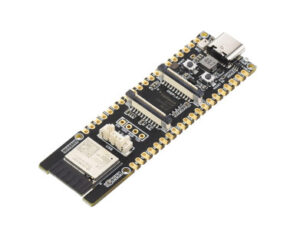
The example has been tested on a ESP32-P4-WIFI6 board:
Contents
- Choosing the Formats
- The Pipeline
- Live Streaming: What Is Different
- Watching the Stream
- The Example Step by Step
- Exchanging the Components
- Performance
- Troubleshooting
Choosing the Formats
A live stream has no end and viewers can join at any time. This rules out containers that need an index or a header describing the whole file (MP4) or that are meant to be read from the start (AVI). The natural choice is the MPEG Transport Stream (MTS / TS): it consists of independent 188 byte packets, and MuxerMTS repeats the stream description (PAT/PMT) before every keyframe, so a viewer that joins in the middle of the stream finds everything it needs to start decoding.
The usual codecs in a transport stream are:
- Video: H.264 – supported by every player and by browsers.
- Audio: AAC – in ADTS frames, as MuxerMTS expects them.
MTS can also carry MJPEG, but there is no standard way to signal it in a transport stream, so generic players and browsers won't recognize it.
The Pipeline
camera  -> CameraFrameSourceTinyCamera -> H264EncoderESP32P4 --\
                                                                 > MuxerMTS -> ExtensionStream -> HTTP clients
mic     -> I2SCodecStream              -> AACEncoderVO -------/
| Component | Class | Library |
|---|---|---|
| Camera | CameraFrameSourceTinyCamera | TinyCamera |
| H.264 encoder (ESP32-P4 hardware) | H264EncoderESP32P4 | codec-h264-ESP32P4 |
| H.264 encoder (software, any board) | H264Encoder | TinyH264 |
| Microphone | I2SCodecStream | arduino-audio-driver |
| AAC encoder | AACEncoderVO | codec-vo-aacenc |
| Container | MuxerMTS | arduino-audio-tools |
| Driver of the pipeline | VideoMuxerWithTasks or VideoMuxer | arduino-audio-tools |
| Web server | HttpServer and ExtensionStream |
TinyHttp |
VideoMuxer or VideoMuxerWithTasks?
For video only, VideoMuxer is good enough: it is driven by calling copy() in loop(), which captures, encodes and writes one frame at the configured frame rate, and needs no tasks and no mutex.
To stream video and audio together from live sources, use VideoMuxerWithTasks. The microphone delivers its samples continuously and only has a small buffer, while capturing and encoding a video frame takes a long time in comparison. In a single loop the microphone isn't read while a frame is being encoded, so its buffer overflows and audio is lost – and the video frames are delayed by the audio processing in turn. VideoMuxerWithTasks runs one task for each track: the video task captures and encodes a frame at the configured frame rate, and the audio task is paced by the blocking reads from the microphone. Both run independently, so no video frames and no audio are lost.
Live Streaming: What Is Different
Timestamps from real time
By default MuxerMTS calculates the video timestamps from the frame number and the configured frame rate. This is right for a file, but wrong for a live source that delivers fewer frames than configured: the player then shows the frames faster than they arrive, and its latency grows steadily (we measured +5 seconds after 30 seconds, with 6.6 instead of 8 frames/s). For a live source call
mts.setRealTime(true);
so that the video timestamps are taken from the actual capture time. The latency then stays constant, whatever frame rate the board achieves.
Keyframes
A viewer can only start decoding at a keyframe (IDR frame). Set the keyframe interval (GOP) to about one second, e.g. encoder.setGop(fps), so that a new viewer sees a picture after one second at the latest. Players report the frames before the first keyframe as errors (e.g. ffmpeg: "non-existing PPS 0 referenced"): this is expected and harmless.
Multiple viewers
TinyHttp's ExtensionStream keeps a list of all clients that requested its URL and sends everything written to it to each of them. Since it is a Stream, it can be used directly as output of the muxer: each frame is encoded only once, however many viewers are connected. A slow client slows down all of them, since the writes are blocking.
Tasks and the mutex
The video task, the audio task and the web server in loop() all use the muxer and the client list of the ExtensionStream, which are not thread safe: the web server adds new clients to the list while the tasks are writing to it. Pass one mutex to VideoMuxerWithTasks and lock the same mutex in loop() around server.copy(). Wait outside of the lock, and switch off TinyHttp's own wait (server.setNoConnectDelay(0)), so that the tasks never wait for a sleeping loop().
WiFi power save
WiFi power save delays and throttles the outgoing data. TinyHttp's server.begin(port, ssid, password) (and AudioServer) switch it off on ESP32, so you don't need to call WiFi.setSleep(false) yourself.
Watching the Stream
VLC, ffplay, mpv
Open the stream URL, e.g. http://192.168.1.33/stream.ts. The players buffer the network stream, which adds to the latency: VLC by 1 second by default. You can reduce this with
vlc --network-caching=200 http://192.168.1.33/stream.ts
ffplay -fflags nobuffer -flags low_delay -framedrop http://192.168.1.33/stream.ts
Web browser
Browsers can't play an MPEG transport stream in a <video> element. mpegts.js converts it in the browser into a format the video element can play (using Media Source Extensions). The example serves a small page at / which loads mpegts.js from a CDN (so the browser needs internet access) and plays /stream.ts in live mode with low latency settings:
<script src="https://cdn.jsdelivr.net/npm/mpegts.js@1.7.3/dist/mpegts.js"></script>
<video id="video" muted autoplay playsinline controls></video>
<script>
const player = mpegts.createPlayer(
    {type: 'mpegts', isLive: true, url: location.origin + '/stream.ts'},
    {enableStashBuffer: false, liveBufferLatencyChasing: true});
player.attachMediaElement(document.getElementById('video'));
player.load();
player.play();
</script>
Browsers only autoplay muted videos: use the player controls to switch the sound on. Browsers without Media Source Extensions (e.g. Safari on older iPhones) can't play the stream this way.
The Example Step by Step
The webserver-video-ext.ino example was written for a Waveshare ESP32-P4-WIFI6 with its OV5647 MIPI-CSI camera. The objects:
// web server: serves the player page and the MPEG transport stream
WiFiServer wifi;
HttpServer server(wifi);
ExtensionStream out_streams("/stream.ts", tinyhttp::T_GET, "video/mp2t");

// Muxer
MuxerMTS mts(out_streams);
VideoMuxerWithTasks video(mts);
Mutex mutex;  // shared by the tasks and the web server

// video pipeline: camera -> H.264 encoder -> MuxerMTS
CameraFrameSourceTinyCamera camera;
H264EncoderESP32P4 encoder;

// audio pipeline: microphone -> AAC encoder -> MuxerMTS
I2SCodecStream mic(WaveshareESP32P4WIFI6);
AACEncoderVO aac;
In setup() the microphone is started first (16 kHz mono), then the camera (320×240 RGB565). CameraFrameSourceTinyCamera captures a first frame in begin() to determine the size and format, which configure the encoder:
VideoInfo info = camera.videoInfo();
encoder.setSize(info.width, info.height);
encoder.setVideoFormat(VideoFormat::RGB565);
encoder.setFrameRate(kFps);
encoder.setGop(kFps);  // a keyframe every second
mts.setRealTime(true);
Then the web server is set up and started, and finally the tasks:
server.on("/", tinyhttp::T_GET, "text/html", kPage);
server.addExtension(out_streams);
server.setNoConnectDelay(0);
server.begin(80, ssid, password);

video.setVideoSource(camera);
video.setVideoEncoder(encoder);
video.setAudioSource(mic);
video.setAudioEncoder(aac);
video.setMutex(mutex);
video.setTaskParameters(16 * 1024, 2);  // stack in bytes on ESP32
video.begin();
loop() only serves the HTTP requests:
void loop() {
  {
    LockGuard guard(mutex);
    server.copy();
  }
  delay(10);
}
On this board the camera and the audio codec share one I2C bus: the audio driver starts it with Wire, and the camera uses the same bus via config.sccb_i2c_bus = (i2c_master_bus_handle_t)i2cBusHandle(0); instead of creating a second I2C master on the same pins.
The board needs esp32:esp32:esp32p4:ChipVariant=postv3,PSRAM=enabled,PartitionScheme=huge_app: it has a chip of revision 3, and the default "Before v3.00" build doesn't start.
The simpler webserver-video.ino streams video only, to one client at a time, using VideoMuxer, the software H264Encoder and AudioServer.
Exchanging the Components
Every step of the pipeline is a separate, exchangeable component with a common API: the encoders implement AudioEncoder or VideoEncoder, the containers implement Muxer, and the muxer writes to any Arduino Print. So you can replace each part of the example without touching the rest – usually by changing a single line.
Audio encoders
Any AudioEncoder can be passed to video.setAudioEncoder(). For a video container, it must write exactly one complete audio frame per write(), since the muxers calculate the audio timestamps from the number of frames.
| Format | Class | Library | Notes |
|---|---|---|---|
| AAC | AACEncoderVO | codec-vo-aacenc | used in the example |
| AAC | AACEncoderFDK | codec-fdk-aac | Fraunhofer FDK AAC |
| AAC | AACEncoderFAAC | codec-faac | |
| MP3 | MP3EncoderShine | codec-shine | fast fixed point encoder |
| MP3 | MP3EncoderLAME | codec-lame | needs MP3EncoderLAME mp3(true): LAME delivers its output in arbitrary chunks, the flag splits it into complete frames |
E.g. to send MP3 instead of AAC:
#include "AudioTools/AudioCodecs/CodecMP3Shine.h"
MP3EncoderShine mp3;
...
video.setAudioEncoder(mp3);
MuxerMTS expects AAC in ADTS frames (the default of all AAC encoders above), MuxerMP4 raw AAC frames: use e.g. aac.setAdts(false). Without an encoder (VideoMuxerWithTasks without setAudioEncoder()) the audio is written as uncompressed PCM, which AVI and MP4 support.
Containers
Replace MuxerMTS by another Muxer:
| Container | Class | Video | Audio | Plays in |
|---|---|---|---|---|
MPEG-TS (video/mp2t) |
MuxerMTS | H.264, MPEG-1, (MJPEG) | AAC, MP3 | VLC, ffplay, mpv, browser with mpegts.js |
Fragmented MP4 (video/mp4) |
MuxerMP4 | H.264, MJPEG, raw | AAC (raw), PCM | VLC, ffplay, mpv |
AVI (video/avi) |
MuxerAVI | MJPEG, H.264, raw | PCM, MP3, AAC | VLC, ffplay, mpv – not in browsers |
MPEG Program Stream (video/mpeg) |
MuxerMPG | MPEG-1 | MP2, MP3 | VLC, ffplay, mpv |
All of them are streaming writers that never need to seek, so they can write to a network client. But only MPEG-TS repeats its stream description before every keyframe: the other ones write their header only once in begin(). So a viewer can't join a running MP4 or AVI stream – instead, start a new muxer session for each client, as the webserver-video.ino example does (video.begin() in the callback that serves a client). Use mimeVideo() of the muxer as content type of the reply.
Video encoders
Any VideoEncoder can be passed to video.setVideoEncoder():
| Format | Class | Library | Platform |
|---|---|---|---|
| H.264 | H264EncoderESP32P4 | codec-h264-ESP32P4 | ESP32-P4, hardware encoder (used in the example) |
| H.264 | H264EncoderESP32S3 | codec-h264-ESP32S3 | ESP32-S3, Espressif's software encoder |
| H.264 | H264Encoder | TinyH264 | any platform, software encoder |
| MPEG-1 | MPGEncoder | TinyMPG | any platform, for MuxerMPG or MuxerMTS |
| MJPEG | MJPEGEncoder | TinyJPEG | any platform, software encoder – or no encoder at all, see below |
E.g. the portable software encoder instead of the ESP32-P4 hardware:
#include "AudioTools/Video/CodecH264.h"
H264Encoder encoder;
...
encoder.setSize(info.width, info.height);
encoder.setVideoFormat(VideoFormat::RGB565);
encoder.setQp(28);
encoder.setKeyframeInterval(kFps);
MJPEG directly from the camera
For MJPEG you don't need an encoder – and no special class either – if the camera delivers JPEG images itself: the sensor's own JPEG output, or on the ESP32-P4 its hardware JPEG encoder. Request JPEG from the camera and don't call setVideoEncoder(): VideoMuxer and VideoMuxerWithTasks then pass each image to the muxer as it is, as one frame. CameraFrameSourceTinyCamera reports these frames as VideoFormat::MJPEG, so the muxer is configured for MJPEG automatically:
MuxerAVI avi(out_streams);  // or MuxerMP4
VideoMuxerWithTasks video(avi);
...
config.pixel_format = PIXFORMAT_JPEG;
camera.begin(config, kFps);
video.setVideoSource(camera);  // no setVideoEncoder()
Use MJPEGEncoder instead if the camera only delivers raw pictures (e.g. RGB565). Either way the JPEG images can be put into an AVI or MP4 container: both have been verified to produce files that ffmpeg decodes without errors. MPEG-TS can carry them too, but since there is no standard stream type for MJPEG in a transport stream, generic players don't recognize it (ffmpeg e.g. sees only a data stream) and browsers can't play it – use AVI or MP4 for MJPEG. Keep in mind that a viewer can't join a running AVI or MP4 stream (see Containers).
Web servers
The muxer writes to any Print, so the server is exchangeable as well:
- TinyHttp (
HttpServer+ExtensionStream, used in the example): serves several pages and any number of viewers of the same stream. - AudioServer (AudioServerWiFi, AudioServerEthernet): part of this library, serves one client at a time with a callback that receives the client's
Print– see webserver-video.ino. With AudioServerEthernet the stream goes over Ethernet instead of WiFi. - Any other server: a plain
WiFiServer/EthernetServer, or any web server that gives you access to the client: send the HTTP reply header and pass the client tomts.setOutput(). - No HTTP at all: the RTSP Server can stream H.264, MJPEG and MPEG-TS as well.
Performance
Measured on the Waveshare ESP32-P4-WIFI6 at 320×240, streamed over WiFi:
| Encoder | Frames/s | Notes |
|---|---|---|
| H264Encoder (TinyH264, software) | 6.6 | fixed QP 28, about 1.9 KB per frame |
| H264EncoderESP32P4 (hardware) | 8 | the configured 8 frames/s; more are possible |
The hardware encoder is far faster than the software one, so with it the limits are the camera capture and scaling and the WiFi throughput. AAC at 16 kHz mono adds about 35 kbit/s.
Troubleshooting
- The latency grows over time: the timestamps don't follow the real time – call
mts.setRealTime(true)(see above). - Task watchdog ("IDLE0 did not reset the watchdog"): a task that never waits doesn't let the idle task run. VideoMuxerWithTasks waits at least 1 ms per frame, even if encoding is slower than the frame rate.
- Stack overflow in the video task: an H.264 encoder needs a lot of stack – set it with
setTaskParameters()(on ESP32 the size is in bytes). - Errors at the start of playback: the frames before the first keyframe can't be decoded – see Keyframes.
- No sound in the browser: the video starts muted – unmute it with the player controls.
The latest, update version of this document can be found in the Wiki of the AudioTools.

0 Comments